

DroidPlay Core
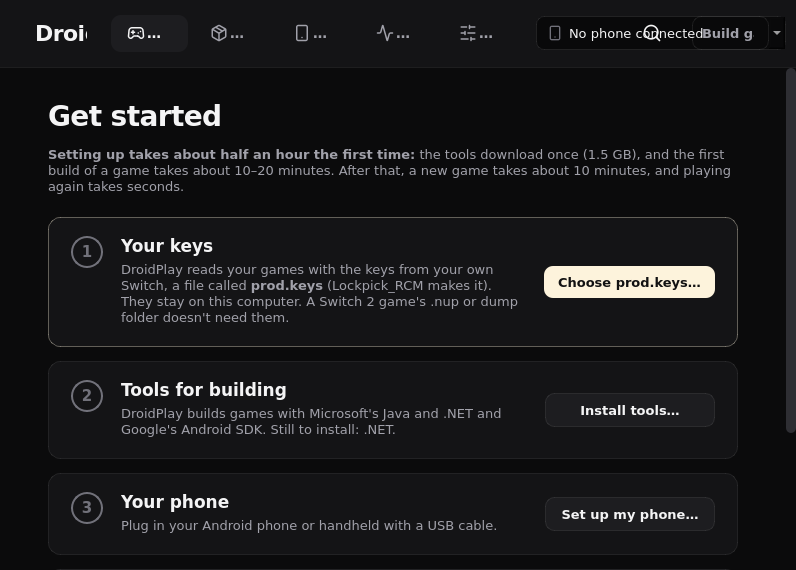
DroidPlay builds your own copy of a Switch game into an Android app: the game's code runs directly on the phone's processor, not in an emulator, and its graphics are drawn by the phone's GPU through Vulkan. You build each game once on this computer, and DroidPlay installs it on your phone over adb.
Bring your own game: you dump the game and the keys from your own Switch. Nothing from any game comes with DroidPlay.
Compatibility: Uses the C library of the system (may need glibc 2.34 or later)
GitHub Download DroidPlay_Core Website DroidPlay_Core Bugtracker
Usage
DroidPlay_Core is available as an AppImage which means "one app = one file", which you can download and run on your Linux system while you don't need a package manager and nothing gets changed in your system. Awesome!
AppImages are single-file applications that run on most Linux distributions. Download an application, make it executable, and run! No need to install. No system libraries or system preferences are altered. Most AppImages run on recent versions of Arch Linux, CentOS, Debian, Fedora, openSUSE, Red Hat, Ubuntu, and other common desktop distributions.
This AppImage uses the C library of the system and may need glibc 2.34 or later. It does not run on distributions that use a different C library (such as musl on Alpine Linux) or an older glibc.
Running DroidPlay_Core on Linux without installation
Unlike other applications, AppImages do not need to be installed before they can be used. However, they need to be marked as executable before they can be run. This is a Linux security feature.Beware! AppImages are usually not verified by others. Follow these instructions only if you trust the developer of the software. Use at your own risk!
Download the DroidPlay_Core AppImage and make it executable using your file manager or by entering the following commands in a terminal:
chmod +x ./*.AppImageThen double-click the AppImage in the file manager to open it.
Sandboxing DroidPlay_Core
If you want to restrict what DroidPlay_Core can do on your system, you can run the AppImage in a sandbox like Firejail. This is entirely optional and currently needs to be configured by the user.
Updating DroidPlay_Core
If you would like to update to a new version, simply download the new DroidPlay_Core AppImage.
Integrating AppImages into the system
If you would like to have the executable bit set automatically, and would like to see DroidPlay_Core and other AppImages integrated into the system (menus, icons, file type associations, etc.), then you may want to check the optional appimaged daemon.
Note for application authors
Thanks for distributing DroidPlay_Core in the AppImage format for all common Linux distributions. Great! Here are some ideas on how to make it even better.
Pro Tips for further enhancing the DroidPlay_Core AppImage
Please consider to add update information to the DroidPlay_Core AppImage and ship a .zsync file so that it can be updated using AppImageUpdate. Tools like appimagetool and linuxdeployqt can do this for you easily.
Please consider making the DroidPlay_Core AppImage self-contained, so that it does not depend on the C library of the system and runs on more distributions: ship the C library including its loader (ld-linux-*.so.*) and use it to launch the application, or link statically.
Thanks for shipping AppStream metainfo inside your AppImage. Please open a pull request on https://github.com/AppImage/appimage.github.io/blob/master/data/DroidPlay_Core if you have changed it and would like to see this page updated accordingly.
If you would like to see a donation link for the application here, please include one in the AppStream data.